Showing posts with label planner. Show all posts

Thursday, October 1, 2020

Spiritual Seeds Planner Review and Giveaway #spiritualseedsplanner #spreadtheseeds #weeklyplanner #faithplanner #ledbythespirit #ComplimentaryProductReceived


Disclaimer: I received a complimentary copy of this product through FrontGate Media in exchange for my honest review. I was not required to write a positive review nor was I compensated in any other way.

The Spiritual Seeds Planner is a planning tool that is different from most planners in that it is Christian based. This planner helps Christians organize their lives to be filled with the Holy Spirit, love others, grow spiritual fruit, and become more like Christ. The Fruit of the Spirit is Love, Joy, Peace, Patience, Kindness, Goodness, Gentleness, Faithfulness and Self-Control. (Galatians 5:22-23) These are the foundations of this planner. It uses a fun gardening theme concentrating on four garden plots – Friends/Family, Self, Community, Vocation/Work. Each month has a focus on one Fruit, describing actions to plant + cultivate + grow. Daily actions are planned to focus on Spiritual growth rather than achievement. The planner comes with 2 sheets of cute garden themed stickers that provide visuals for tracking growth and a bookmark with the definitions and scriptures of the Fruit of the Spirit.

The 2021 Weekly Planner Consists of:

  • Easy to follow instructions with visuals
  • Fruit Vision Board (Annual)
  • Monthly Fruit Focus and Planning Pages
  • Monthly Inspirational Prayers
  • Weekly Dated Calendar, starting on Monday
  • Month at a Glance
  • 2021/2022 Year at a Glance calendar
  • Blank note pages each month
  • Faux Leather Cover
  • Monthly Tabs
  • Ribbon Bookmark
  • Interior Back Pocket
  • Elastic Band Closure
  • Planner measures 10" long and 7" wide

Bonus items!

  • 2 pages of stickers
  • Bookmark with the definitions and scriptures of the Fruit of the Spirit


My Thoughts:

I received the Adult and Teen Challenge Package. It has a free Fruit of the Spirit Tote bag, notepad, pencil case and pens to go with the planner. I received the 2021 weekly planner in Coconut Brown and bonus items that go with it as well. The Spiritual Seeds Planner has partnered with the Pacific Northwest Adult and Teen Challenge supporting their dedication to seeing people liberated from life controlling issues through the power of Jesus Christ. Adult and Teen Challenge students dedicate twelve months to transforming their life. A Spiritual Seeds Planner provides the student a place to plan their days and record their journey. You can purchase one of these packages and Spiritual Seeds Planner will donate and deliver it to a student in need.

Adult and Teen Challenge Package

This planner is a lovely instrument to help go throughout the year growing ever closer to Christ and the Holy Spirit. I love the gorgeous faux leather cover. It has a lovely tree carved into the front with the words from the Fruit of the Spirit written along its branches. I love the theme of gardening and growth. Growing closer to Christ with this Spiritual Seeds Planner is the perfect way to start the new year.


WIN IT

  • Prize: Win a copy of Spiritual Seeds Planner
  • Host: Spiritual Seeds Planner and FrontGate Media.
  • Who Can Enter: Open to US Residents 18 years or older.
  • Selection Process: 1 Winner will be selected on 10/25/2020 and notified by email.
  • Where to Enter: Go to this link https://www.blessedfreebies.com/spiritual-seeds-planner.html and fill out the form to enter.


BUY IT

Purchase the Spiritual Seeds Planner with coupon code: FRUITOFSPIRIT and get 20% off your order ($28 planner plus shipping, or $40 planner/sticker book plus shipping, saving $7-$10).

Tuesday, October 11, 2016

MyFreezEasy MyFreezEasy.com Freezer Meal Plan Membership Review


My family had the privilege of trying the MyFreezEasy.com Freezer Meal Plan Membership from MyFreezEasy for this review to use in conjunction with our own homeschool curriculum and family/farm life. This is a Homeschool Review Crew Review. All opinions expressed are my own or those of my family. Affiliate links are in this post. Thanks for supporting this blog.

Erin Chase, $5 Dinner Mom, is the brains behind $5 Dinners, $5 Meal Plan, Grocery Budget Makeover, FreezEasy, and now MyFreezEasy. She puts out a free weekly email newsletter that I subscribe to where she shares recipes, tips and tricks for getting the grocery budget under control. I have loved these valuable emails and delicious recipes throughout the months. I also follow her blog where she posts recipes, coupon matchups and deals, printable coupons, and more to help save you and I money. Her Grocery Budget Makeover I cannot really vouch for myself as I have not taken this 10-week course, but from reviews I have read it sounds like it really works in cutting your grocery spending in half. FreezEasy is her freezer cooking meal plans that will help you prepare 10 delicious meals to load into your freezer in under an hour. MyFreezEasy is new. It is similar to Basic FreezEasy, but gives you even more control to personalize the plan.

The MyFreezEasy Premium Annual Membership gives you access to the online program and website for a whole year. Each month members have access to all eight meal plans to download: Traditional, Gluten-Free, Slow Cooker, Clean Eats, 20 Meals, All Chicken, All Ground Beef, All Pork Chops. The majority of the months meal plans have 5 recipes that have been hand-picked by Erin for that month. With these plans you make two of of each meal to freeze so that you get a total of 10 meals. These premade meal plans are all set for only 4 servings...so if you need more or less it is wonderful that MyFreezEasy Premium plan has the opportunity to Build Your Own Meal Plans unlike the Basic FreezEasy that only lets you purchase premade ones.
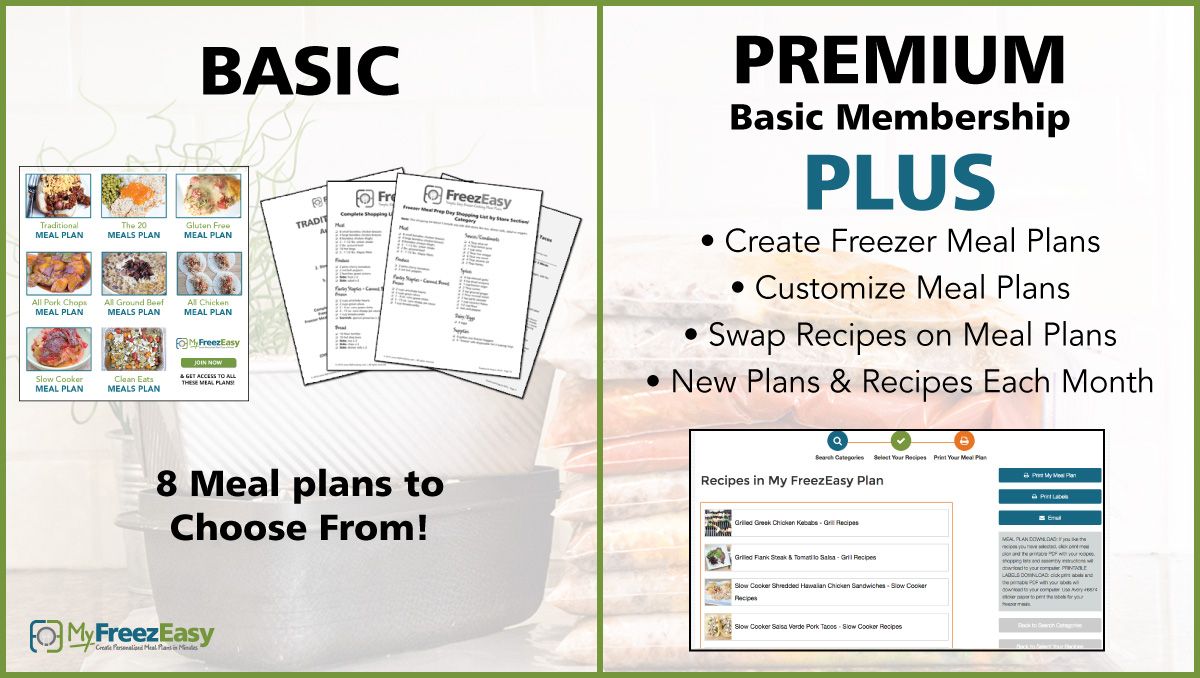


Along with the freezer cooking plan downloads you get a number of bonuses. First, you can also get a overview of the program by going to the How MyFreezEasy Works Resources and Instructions page which includes a how-to PDF, a Favorite Side Dish Recipes E-Cookbook to download, and a link to the Freezer Cooking Workshop videos to get you started. You can also download printable labels for each meal plan (that she recommends be printed on Avery #6874 sticker paper). Each month, they release highlights & tips videos for all 8 new meal plans, along with 1 assembly instruction video for the Traditional Plan in the Video Library. These assist with the production of making the freezer meals.

From the Build Your Own Meal Plans area you could select the recipe by three different aspects on this page: Type of Protein, Cooking Method, and Dietary Preferences. In each of these search categories they have the recipes further narrowed down. In Type of Protein you could pick from Chicken Recipes, Ground Beef Recipes, Other Beef Recipes, Pork Chop Recipes, Other Pork Recipes, Seafood Recipes, Vegetarian Recipes. In Cooking Method you could pick from Slow Cooker Recipes, Dutch Oven or Saucepan Recipes, Baked Recipes, Skillet Recipes, Grill Recipes, and One Dish Meals. In Dietary Preferences you could pick from My Favorites, Gluten-Free Recipes, Dairy Free Recipes, Gluten Dairy Soy-Free Recipes, Paleo/Whole30 Recipes, and Top 8 Allergy Free Recipes.

MyFreezEasy: 1. Search Categories, 2. Select Your Recipes, 3. Print/Download Your Meal Plan

Once you select one of these categories you can pick from the recipes listed in that certain one. You can click on each recipe title to see a popup of the actual recipe and also choose the serving size (2, 4, 6,or 8) in the drop down menu. You can then either drag and drop 5 recipes you want to prepare in the drop box or add them to it with the + sign from the popup of the recipe. You can go back to the main menu and select a different category as well for more recipes. You can also clear the whole drop box list or drag the recipes you don't want out of the box one by one. After you have selected 5 recipes total for the My FreezEasy Recipes drop box with the correct serving size you can hit the Review and Print button. This will take you to another page to see the 5 that you picked for one final look over before you press Print My Meal Plan and Print Labels (which actually downloads 2 separate printable PDF files onto your computer). You can also select Email which emails you the Complete Shopping List by Recipe with handy check boxes beside each item to take with you to the grocery store.

Each meal plan PDF for 5 recipes is laid out for easy instruction. Each one has the Recipes, Shopping Lists (Complete Shopping List by Recipe, Complete Shopping List by Store Section/Category, Freezer Meal Prep Day Shopping List by Recipe, and Freezer Meal Prep Day Shopping List by Store Section/Category), and Assembly of Meals (Assembly Prep Instructions and Meal Assembly Instructions).

Each recipe is laid out well. At the top of each recipe you have the title, yield, active time, cook time, and a small summary. Then it goes into Ingredients for Single Meal, Cooking Directions for Single Meal, Assembly Prep Directions for 2 Meals. Under that there is Freeze & Thaw Instructions, Special Notes, Dairy-Free Modifications, and Gluten-Free Modifications for each recipe.

How We Used This and Our Thoughts:

We received the MyFreezEasy Premium Annual Membership which gives us access to the online program and website for a whole year! We started the membership back in September and also got access to October's meals this month so far. I made two of each of the 5 meals that I chose for September for the freezer so far. We have access to each month's meal plans as they become available every month. These were easily customized and I really loved that fact.

Freezer Meals -1 that we made for dinner that same night.

Having a family of 6 I couldn't really just go with the premade meal plans because they were all set for only 4 servings. So, I opted to make my own freezer cooking meal plan from the available recipes in the Build Your Own Meal Plans area. For September I made a list of 5 recipes that sounded good to me at the time: Baked Honey Mustard Pork Chops, Ranch Chicken & Baby Potato Bake, Roasted Cod with Pesto, Slow Cooker Shredded Beef Tacos with Mango Avocado Salsa, and Slow Cooker Taco Soup.

I had a few problems with MyFreezEasy...
  1. When I went to change the serving size to 6 I think things got a little jumbled. The canned ingredients didn't really convert well and so when the ingredients lists were read, we had things like: 3/4 x 1 15 oz. can(s) black beans...of which I thought was quite awkward and to me really didn't make sense. Also some of the ingredients in the different sections had different amounts, for example, Slow Cooker Taco Soup for 6 says 1/2 cup(s) beef broth in the Ingredients for Single Meal, but for the Freeze & Thaw Instructions it says 2 cups beef broth. This is inconsistent and quite confusing.
  2. The My Favorites online didn't seem to work for me. I couldn't add any recipes to it by dragging and dropping them into that section and when I hearted them from the popup recipe they didn't seem to go to that section either.
  3. After I baked the Ranch Chicken & Baby Potato Bake I noticed that the potatoes in the dish didn't taste right. From what I am told certain ingredients including raw potatoes need to be blanched before freezing so they maintain their integrity and correct texture. The recipe never mentions blanching and so instead, the potatoes turned out gritty and watery...inedible in my family's opinion. The Ranch Chicken & Baby Potato Bake also took me the longest to prepare for the freezer because of all the chopping of chicken and potatoes (because I couldn't find "baby potatoes"). It also said to get bacon crumbles and I couldn't find these so I made actual bacon and crumbled it myself. This recipe took the longest and was a big disappointment, so I will not be making it again.

Roasted Cod with Pesto (top) and Slow Cooker Taco Soup (bottom)

All in all most the recipes that I prepared and tried were really good. I especially loved the Roasted Cod with Pesto (we made this recipe the same night we put the ingredients for all the recipes together) and the Slow Cooker Taco Soup. These didn't take me long to prepare for the freezer and they were delicious and easy to cook. I am excited to still try the Baked Honey Mustard Pork Chops and the Slow Cooker Shredded Beef Tacos with Mango Avocado Salsa of which were both also very easy to put together for the freezer. I am also excited to try even more meals in the months to come.

The MyFreezEasy MyFreezEasy.com Freezer Meal Plan Membership is well worth the investment in my opinion. Even with its quirks it definitely takes the edge off of finding something delicious for dinner and getting a meal thrown into the oven/crock pot/skillet/grill etc. quickly. The freezer meal prep doesn't take too long either and you can get 10 meals prepared in an hour although I do admit that it took me longer. I highly recommend this to busy parents everywhere.


BUY IT
Basic Monthly is $7 a month. Basic Annual is $77 per year with 1 month free. Premium Monthly is $10 a month. Premium Annual is $95 per Year with 2+ Months Free!! Get Started!

Follow Them on Social Media:
Facebook:  http://www.facebook.com/freezeasy
Instagram:  http://www.instagram.com/freezeasy
Pinterest:  http://www.pinterest.com/5dollardinners/freezeasy 
Hashtags: #hsreviews #freezeasy #freezermeals #5dollardinners #freezercooking 

Read other TOS Crew reviews for MyFreezEasy MyFreezEasy.com Freezer Meal Plan Membership...
MyFreezEasy.com Freezer Meal Plan Membership {MyFreezEasy}

Crew Disclaimer

Thursday, June 23, 2016

MySchoolYear.com My School Year (Homeschool Record Keeping) Review


My family had the privilege of trying the Annual Membership of the My School Year (Homeschool Record Keeping) from MySchoolYear.com for this review to use in conjunction with our own homeschool curriculum. This is a Schoolhouse Review Crew Review. All opinions expressed are my own or those of my family.

MySchoolYear.com is an online homeschool planner. It is great for record keeping, tracking, reporting, planning, and making lesson plans. This online database is wonderful for anyone that needs to totally organize their homeschool. It keeps grades, attendance, transcripts, report cards, awards, etc. for your students right at your fingertips. The My School Year (Homeschool Record Keeping) makes it easy to add, subtract, recreate, and save information. Since it is stored online you can access it anytime and anywhere you need to with internet.

Registration Wizard. If you click the need help buttons it will help you with all processes.

The My School Year (Homeschool Record Keeping) is very simple to use. You start out by picking what time frame for your school term you would like to use: traditional (September through May), quarters, or semesters. Then you can pick the name of your homeschool. If you have more than one place your student has instruction, for example, a music instructors home, you may also enter that.  Then you can begin entering all of your students and their subjects and classes. Under each class you are able to enter the curriculum that will be used for each student for that school year.

Teacher's Aid

The website is easily navigated as well. At the top left you will see a pull down menu you can click on under "My Homeschool". This shows many pages that you may go to within the website...
  • Homeroom: This webpage lets you select a student a view an overview of everything with charts of their current homeschool status. This is a great place to see classes, attendance, events, awards, readings, extra curricular, and tests all on one screen for each student. You may also add, edit or view these as well from here. 
  • Planbook: On this webpage you can update lessons, mark lessons as complete, reschedule as needed, and/or change them altogether. With this you can know exactly what is overdue, current, or upcoming. The Planbook also has a search, filter and sort options to easily find a lesson you are looking for. 
  • Reports: This webpage gives you access to awards, course descriptions, events, extra curricular, instructional hours, lesson plan, materials - lesson plan, materials - reading log/list, reading log/list, report card, standardized tests, and transcript. You may sort these by: all reports, all-student based, all-term based, non-term based, and reference.
  • Teacher's Aid: This webpage will alert, warn, and/or recommend what you should be doing next. This takes the guesswork out and reminds you when something needs done. There is also a orange circle up by the pull down menu that tells you how many alerts you need to fix or remove.
  • Tools: Copy classes/lessons, copy reading log/list, create-a-plan, reschedule lessons, and track attendance with ease. Create-A-Plan lesson generator can create lessons in bulk. Use Rapid Repeat, a repeater tool for if your student is doing something more than once, and Quick Split, a tool to help you know how many pages to assign of a book if you want an equal amount per day, to help you too. 
  • Setup: You can setup grading scales, materials, schools, students, subjects, terms (school years) with these pages.
  • My Account: You can view your profile, settings, and password and update these if needed.
  
How We Used This and Our Thoughts:

We received an annual membership of the My School Year (Homeschool Record Keeping). I am not much of a planner and usually homeschool with the flow of the day, so at first this seemed like a daunting and overwhelming task to me. Oregon state law is fairly lenient on homeschoolers that live here. Oregonians do not have to send in lesson plans, curriculum, or a portfolio of the students work. We only have to let the Educational Service District (ESD) know we are homeschooling and have our students test at grades 3, 5, 8 and 10. I know my homeschool needs a bit more structure and organization though, so I was happy to try out this planner to see if it would help me with this.

I placed my four children in the program and set their classes up for the upcoming school year (2016-2017). I made a curriculum of what they were going to study and when for each class. I love the Create-A-Plan lesson generator and the Rapid Repeat and Quick Split makes it so much easier to configure. I like that I can receive weekly and/or daily emails of the lessons that need done each day and my students can get sent one as well of their lessons needing accomplished. This is especially great for my sons in high school because I can create documents like transcripts and report cards and MySchoolYear.com shows me exactly how and gives me samples of each to pull from. I am happy to know that my homeschool information that I enter in is secure in the cloud as well. There is still a lot to add and fill in for next year, but I love this program because of how simple it is to use and set up.

BUY IT
You can try the free month trial to see how you might like this program. There are two Membership Plans: Monthly for $5 per month or Annual for $40 a year (save 33%!). Both plans also include a free month trial and the annual plan has a price lock guarantee.

Follow Them on Social Media:
Facebook - http://www.facebook.com/MySchoolYearWeb/
Twitter - https://twitter.com/@MySchoolYearWeb
Google+ - https://plus.google.com/+MyschoolyearWeb 
Hashtags:  #hsreviews #recordkeeping #homeschoolorganization

Read other homeschool curriculum reviews for MySchoolYear.com...
Homeschool Record Keeping {MySchoolYear.com Review}

Crew Disclaimer

Wednesday, July 15, 2015

Homeschool Buyers Co-op Homeschool Planet Review

My family had the privilege of trying Homeschool Buyers Co-op Homeschool Planet for this review to use in conjunction with our own homeschool curriculum. This is a Schoolhouse Review Crew Review. All opinions expressed are my own or those of my family.

Homeschool Buyers Co-op is the world's largest cooperative buyers club for homeschooling families. This free to join co-op is a family-owned and operated business (since 2005), dedicated to providing top-quality curriculum and homeschooling resources at the lowest price possible. You can save 20-90% on curriculum when you participate in GroupBuys where the more people opt in to buy the item the more the group saves as a whole. Not only that, but this free membership includes other perks as well. You get access to: their database of free homeschool curriculum & other resources, free homeschool classifieds, field trip finder, educational contests & scholarships for homeschooled kids, homeschool conferences and events, writing tips, homeschool ID card templates, 30 day free trial of Homeschool Planet, deals of the week special offers, smart points rewards you can earn, and becoming an affiliate. I love Homeschool Buyers Co-op because it has saved me money on curriculum and homeschooling resources. I am so glad to be a part of it.

Homeschool Buyers Co-op gave me a full year of their Homeschool Planet program for free to try out for myself for use with both my home and my homeschool. Homeschool Planet is an awesome full featured planner that not only plans your homeschool day, but every other aspect of your life as well. You do not have to download anything special to use it and it works on any device with a web browser and a broadband Internet connection since it is entirely online. You can use it to schedule classes, assignments, appointments, events, and daily chores. You can also make to do lists and shopping lists. It is so easy to use and very flexible.

How We Are Using It:

Since we usually take off our homeschool and just do relaxed unschooling during the summer, my family has been using the Homeschool Planet so far to fill in fun stuff we have planned and appointments that we have scheduled. We love all the features so far and love the fact that we can print off our calendar or lists if we want to. I have found that Homeschool Planet is so much simpler to use than bound planners or ones printed on paper because of the automatic rescheduling feature it has. No more having to rewrite whole pages just because of one change. You can effortlessly shift things around, even whole schedules, within Homeschool Planet. When you have filled out the calendar everyone in your family with an email added will be getting Daily Digests by email with their own schedule, assignments, and chores for the day so they can keep track of their own stuff. There are also both email and text message reminders that you can set up within the program.

Automatic Rescheduling Helper. (stock photo)

Online Help Video. (stock photo)

When I first launched Homeschool Planet I was able to click on a link to watch a helpful how-to tutorial video of a brief overview of the features in the program. It was very informative and told me exactly what to expect. I liked that it started out like this so you can get a feel for the program before you try to dive into it on your own. There are also a bunch of tutorials listed in the help section of the planner.

This is how the screen looks as you put in Profile information for each member of your family. (stock photo)

You can also check attendance from the profile box. (stock photo)

From the profile box you can tell it to make an individual separate log in and pick what each person has access to. (stock photo)

The whole thing is very easy to customize. When you put in individual family members you can put in pictures for their avatars, update name, grade, email, and cell phone. You can put in each member of your family to have it show their schedules individually or all together on the different modes. You can let individual family members have their own password as a separate log in to have access to check off their stuff and be emailed or text messaged their schedules and plans as well. In the settings you can edit all sorts of things to make it more personalized. I love that they have different display themes to choose from also. My favorite is the horse themes and the butterfly ones. I hope they get a lot more to choose from too because I like to change the themes to what I am feeling and what holiday is coming up...just like I love to decorate my home.

Calendar view month format (stock photo)

Calendar view day format (stock photo)

There are three modes that are within Homeschool Planet: Calendar view, Planner view, and the third is the Resources view...
  • Within the Calendar view you can toggle between day, week, and month. In day and week you can see hours of the day listed on the side so you can schedule things at a certain times. You can also go back and forth with arrows for months previous or coming up. If you click on the S in either corner you can hide or show weekends. A popup window will appear to ask you what you want to add if you click on a day and certain time. You may click class, birthday (which also includes other significant holidays/special events), or everything else. When you add things you can specify its highlight color according to a certain category; for example, church or doctor/dental. You can also specify what activity it is, add notes, for whom it is for, and if it repeats itself somehow. It is so easy to add everything to the calendar that needs to be scheduled. 
  • Within the Planner view are mostly the same features as the Calendar view except that it is in the form of a list instead of a calendar. 
  • The Resources view shows you all the books, DVDs, websites, etc. that you are using for your lessons. I like that you can easily add books by ISBN number to make filling out the forms easier. Filling everything out is very straightforward.

Planner view day format (stock photo)

Resources view (stock photo)

I love how easy it is to set up the school year from within the settings so you can then add classes/subjects and their scheduled assignments and lessons on the Calendar and Planner view. You can tell it what days you are actually homeschooling and what days you are taking off. You can also tell it what holidays you observe. When you create a class you can add a subject, title, for whom it is for, and when & what time it will be happening. You can also add information for the lesson plan: assignments, notes, grades & transcript creation, tracked hours & attendance, and resources. I love the fact that you can copy any lesson you make and use it later for another student.

Reports Assignment List (stock photo)
Grading Helper (stock photo)

Transcript creator (stock photo)

Also, there are widgets on the sidebar that you can add or take away. I absolutely love the shopping list and to do list widget on the side. You can pick your stores and make individual lists according to what store has the item on sale. These are also so easy to be sent to your smartphone, sent as text to your spouse when they are out and about, have printed off, or sent to email. I'd love a widget for more meal planning preparation. I also love the weather, daily quote, and Bible verse widgets that change everyday. It is nice to have a scripture to wake up to when checking the schedules and I love knowing what the weather is going to be like also. I'd like to see them expand this section with even more widgets as well in the future.

Do you want to make your life easier and more organized? Is a regular planner making you crazy because of all the rescheduling? Look no further than Homeschool Buyers Co-op Homeschool Planet! Make this homeschool scheduler part of your life today! I recommend this online homeschool planner that also plans so much more to everyone who homeschools!

BUY IT

Once you have a free membership to Homeschool Buyers Co-op, just log in to Homeschool Buyers Co-op and sign up for the free 30 day trial of Homeschool Planet. There you can check it out for yourself without obligation or risk. If you like what you see after the free trial is up you may subscribe for only $65/year or $6.95/month. All your information you entered with the trial will be preserved so you can use Homeschool Planet without interruption.

Follow Them on Social Media:
Facebook: https://www.facebook.com/homeschoolbuyers
Twitter: https://twitter.com/hsbuyerscoop
Google+: https://plus.google.com/112069021534542740249/about

Read other reviews for the Homeschool Buyers Co-op Homeschool Planet...
Homeschool Planet Review

Crew Disclaimer

Monday, March 3, 2014

ShopperIncite Moms Life Moments Coupon Book Review and Offer

I am getting something in return complimentary for posting this information and received a free coupon booklet of my own to facilitate this review. All information was provided by ShopperIncite and PartnersHub. My thoughts are my own.

Having a child is such a very special "life moment". Moms spend a lot on their child's first years. A baby's needs can be very expensive. Coupons help keep more money in your pocket and let you stretch hard earned dollars to fit your budget.

But, who really has the time to find, collect, clip, and organize coupons, especially when you want to spend those precious moments with your newborn or baby? Coupons can be time consuming.


That's why the folks at ShopperIncite are giving away their Shopping Planner™ for New Moms – 100% free of charge – filled with great coupons moms love, all in one convenient place. And it's small enough to take with you anywhere! It fits into a purse or bag easily.


But it's really more than just a coupon book. At the end of the booklet it has a meal planner and shopping list. The pages are also filled with daily doses of tips, tricks and easy-to-make recipes. I love this part of the booklet too. It is so helpful. When you go grocery shopping it is great to have what you are going to make and a list of what you need right there at you fingertips.

You can "opt-in" to get a free coupon booklet of your very own. The more moms who sign up, the more brands with discounts ShopperIncite can offer later. After signing up you will get a new complementary coupon booklet every quarter filled with even more savings and offers.


DISCLOSURE/DISCLAIMER: I have received a free copy of the coupon book to help with my review and I will also receive a complimentary gift card valued anywhere between $10-$50 for posting. (Gift cards are randomly selected by Shopper Incite). Thanks to PartnersHub and ShopperIncite for providing me this promotion information and free product. My thoughts are mine and my family's own opinion and have not been altered by anyone else. I did not receive any other compensation for posting this blog post.

Tuesday, February 5, 2013

Little House Living Meal Planning Made Simple eBook


I recently have been reading a blog called Little House Living. This blog has all kinds of helpful information about country living, homesteading, meal planning, food storage, gardening, canning and preserving, stockpiling, saving money, etc. They also have a couple of things that will make your life easier and more organized. One is an eBook called Meal Planning Made Simple that has calendars, charts, worksheets, and lists to help you with your own meal planning journey. It is ONLY $3.99 with code MEALPLAN! The other item is called the Homesteader’s Home Management Binder and is ONLY $6.99. It is an abundant supply of pages of calendars, checklists, worksheets, logs, lists, etc. to help you with basic household organization, cleaning, cooking/baking, gardening, grocery shopping, money management, etc.

Click here to visit Little House Living to learn more about these helpful products.

I have been enjoying learning and planning my own "Little House" move. As most of you know who have been reading my blog I am planning on moving to a small farm house with my family that has a little over 5 acres. We have already made some preparations and are planning some big changes in the next year or so. One of those changes besides the move itself will be how I organize and plan everything. I plan on incorporating more homemade cooking/baking, gardening, canning and preserving, and other farm living skills in my family life. We already have been making some income renting out our pasture for horses, but since we still haven't moved into our farm house we are still paying for 2 properties. We also have some meat rabbits and we are planning on owning chickens for eggs and possibly some milk goats.

My husband and I have a lot of work ahead of us. We have started gutting the front house so that we can totally make it our own. My husband has his very own CNC router so he can make all kinds of ornamental custom woodwork for the house and we are deciding the look and feel we would like for our kitchen, bathroom and the rest of the house. I am excited for when we will be able to move in.

DISCLOSURE/DISCLAIMER: I wrote this blog post because I thought you might be interested in knowing this information and taking part of this deal. My thoughts are mine and my family's own opinion and have not been altered by anyone else. I did not receive any compensation for doing this post. Affiliate links can be found in this post. Thank you for your support of this blog!

Wednesday, December 26, 2012

eMeals Meal Plans 15% Off Offer For the New Year


eMeals, the online leader in meal planning, offers weekly meal plans that offer families a way to save money on their grocery bill. eMeals can help you get organized in the New Year.

eMeals offers over 50 delicious meal plans and corresponding grocery lists every week based on food style preferences, family size and the current sales at selected grocery stores. Dinner menu plans include classic family meals, low-fat, portion control, low-carb, gluten-free, vegetarian, clean eating, paleo, and the natural and organic plan. For more information, please visit www.emeals.com.

Join us in our effort to promote a healthy lifestyle in 2013. We have created some content that is available for you to repurpose on your blog as you extend our tips for eating healthy, saving money, losing weight, and getting organized in the New Year.

Get 15% off the leading meal planning system @eMeals with coupon code "2013"

DISCLOSURE/DISCLAIMER: Because I am posting about www.emeals.com I am getting a FREE three month online trial subscription to eMeals AND I will be entered to win an iPad. Thanks to USFamilyGuide.com for providing me this promotion information and free product. My thoughts are mine and my family's own opinion and have not been altered by anyone else. I did not receive any other compensation for posting this promo.

Wednesday, June 29, 2011

The Old Schoolhouse Magazine 4th of July Sale

The Old Schoolhouse Magazine is having a 4th of July Sale! During this eight-day sale they'll be offering some fantastic subscription specials, special pricing on the Schoolhouse Planner, and FREE patriotic resources with purchase. Click on the image below to find out more.
DISCLOSURE/DISCLAIMER: Because I am a support leader for The Old Schoolhouse Magazine and posting about this 4th of July Sale I am getting FREE one-year digital subscription to the The Old Schoolhouse Magazine AND 19 FREE educational gifts. This information is from The Old Schoolhouse Magazine's email to me. I did not receive any other compensation for doing this post.

Thursday, November 25, 2010

The Old Schoolhouse Magazine Black Friday Sale

The 5th Annual Black Friday sale from TOS Magazine is on now! Hundreds of products will be on sale with a savings of up to 70%. Purchase a one-year subscription to The Old Schoolhouse® Magazine, and receive a FREE Homeschooling with Heart tote bag, any Schoolhouse Planner of your choice for FREE, and a FREE E-Book: Cranberry Christmas. This Cranberries & Cream holiday subscription bundle is worth over $80, but is only $19.95 from 11/24 through 11/29. Plus, one family is going to win a getaway package to Great Wolf Lodge! Join in the savings and fun--CLICK HERE to get the details!
DISCLOSURE/DISCLAIMER: Because I am a support leader for The Old Schoolhouse Magazine and posting about this Black Friday Sale I am getting coupon for my choice of three Curiosity Files and Expo To Go Fall 2010 for free. This information is from The Old Schoolhouse Magazine's email to me. I did not receive any other compensation for doing this post.